
Vinyl Plotters: Your Secret Weapon for Awesome Sign Making
Vinyl plotters are one of the most versatile tools in professional sign making. Here is how they work, what you can make with them, and how to get clean, precise cuts every time.
Key takeaways
- A vinyl plotter is a computer-controlled machine that uses a sharp blade to cut shapes and letters from self-adhesive plastic sheets.
- Key settings to dial in: blade depth (cut vinyl only, not the backing), pressure (based on material thickness), and speed (slower is often more precise).
- The workflow is design → cut → weed → transfer tape → apply—each step matters for a clean final result.
- Two main vinyl types: adhesive vinyl for signs and decals, heat transfer vinyl (HTV) for fabric and apparel.
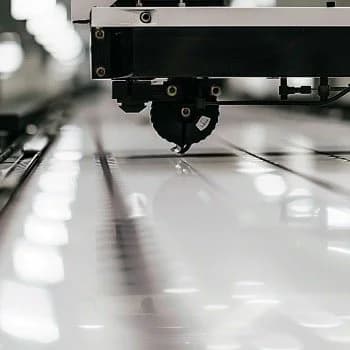
If you have ever walked past a storefront and admired the crisp, professional lettering on the window, there is a good chance it was made with a vinyl plotter. These machines are foundational tools in the sign industry—used to produce everything from window decals and vehicle graphics to custom die-cut stickers and safety signage.
Whether you are exploring sign making as a business or just want to understand how custom vinyl graphics get made, this guide breaks down how vinyl plotters work, what to look for, and how to get consistently clean results.
What is a vinyl plotter?
A vinyl plotter (also called a vinyl cutter) is a computer-controlled machine that moves a small, sharp blade across a roll of vinyl to cut out shapes and letters. Think of it like a printer that cuts instead of deposits ink—the computer directs the blade along vector paths you define in your design software.
The blade cuts through the top vinyl layer but stops short of the backing paper (a technique called "kiss cutting"). After cutting, you peel away the excess vinyl ("weeding"), leaving only your design on the backing, ready to transfer.
Why use a vinyl plotter for sign making?
Vinyl plotters offer a few advantages that make them a go-to tool for sign shops and graphics businesses:
- Precision: Digital servo-driven machines can cut characters as small as 1/8 inch with clean edges.
- Speed: Once a design is set, cutting is fast—ideal for batches of decals or repeat orders.
- Versatility: Beyond standard vinyl, many cutters handle heat transfer vinyl (HTV), thin magnets, cardstock, and specialty films.
- Low waste: Software lets you nest multiple designs on a single sheet to maximize material use.
How do you choose a vinyl cutter?
A few factors matter when selecting a machine:
- Drive motor type: Servo motors offer smoother, quieter operation and better precision on small text; stepper motors are more affordable but less precise on intricate cuts.
- Tracking: If you plan to cut long graphics (banners, vehicle striping, partial wraps), look for a cutter with good tracking—its ability to maintain a straight path over the length of the vinyl.
- Cut width: Desktop cutters (around 12–15 inches) work for small decals; professional cutters range from 24 to 60+ inches for larger signage.
- Contour cutting (ARMS): If you want to cut around printed images, look for a machine with an optical sensor that reads registration marks.
Popular brands include Roland, Graphtec, GCC, Silhouette (for hobbyists), and Cricut (for crafters). For professional sign work, servo-driven machines with reliable tracking are worth the investment.
How do you set up a cut job?
1. Create or import your design
Use vector software like Adobe Illustrator, CorelDRAW, or the cutter's bundled software. Your design needs to be vector-based (not raster images) so the blade has clean paths to follow.
- Keep designs simple when starting out—fine details and tiny text are harder to weed.
- For multi-color designs, separate each color into its own layer; you will cut and layer them individually.
2. Load the vinyl
Feed the vinyl roll into the cutter, aligning it carefully with the pinch rollers. A crooked load leads to crooked cuts. Many machines have a pre-feed function that pulls slack from the roll and establishes tracking grooves before cutting.
3. Dial in your settings
Three settings matter most:
- Blade depth: You want the blade to cut through the vinyl but not the backing paper. Too shallow and the vinyl will not release cleanly; too deep and you will score or cut through the liner.
- Pressure (force): Adjust based on vinyl thickness. Thicker materials need more force.
- Speed: Slower speeds often yield cleaner cuts, especially on detailed designs.
4. Run a test cut
Before committing to a full design, send a small test shape. Check that it peels cleanly and that the backing is intact. Adjust settings if needed.
What is weeding, and how do you do it well?
Weeding is the process of removing the excess vinyl around your cut design. Use a weeding hook or pick tool to lift away the negative space, leaving only the letters or shapes you want.
- Work in good light so you can see the cut lines.
- For intricate designs, weed in sections rather than trying to pull large areas at once.
- If vinyl tears or lifts unevenly, your blade may be dull or your cut settings off.
How do you transfer and apply vinyl?
After weeding, apply transfer tape (also called application tape) over the design. Smooth it down with a squeegee to bond it to the vinyl face. Then peel the transfer tape—with your design attached—off the backing and position it on your substrate (glass, metal, plastic, etc.).
- Squeegee firmly from the center outward to avoid air bubbles.
- Peel the transfer tape slowly at a sharp angle to ensure the vinyl stays on the surface.
- For curved surfaces, use conformable vinyl and consider wet application (a light soap-and-water solution) for repositioning.
For apparel and fabric, you will use heat transfer vinyl (HTV) instead. Cut the design mirrored, weed it, and apply with a heat press or iron.
What materials can a vinyl plotter cut?
Most vinyl cutters handle:
- Adhesive vinyl: For decals, window graphics, wall lettering, and vehicle graphics.
- Heat transfer vinyl (HTV): For T-shirts, bags, and other fabrics.
- Specialty vinyl: Reflective, frosted glass, holographic, and metallic finishes.
- Thin magnet sheets: For magnetic vehicle signs that can be removed and reapplied.
- Cardstock and paper: For packaging inserts, stencils, and craft projects.
Pro tips for better vinyl cutting
- Use registration marks for multi-color jobs: This ensures layers align precisely when stacked.
- Keep your blade sharp: A dull blade causes tearing and incomplete cuts. Replace it when quality drops.
- Clean your machine: Dust and vinyl debris can affect tracking and blade movement. Wipe down rollers and the cutting strip periodically.
- Store vinyl properly: Keep rolls upright and away from heat and humidity to prevent curling or adhesive issues.
When to hire a sign shop instead
Vinyl plotters are great for in-house production if you have the volume and time. But for complex projects—large vehicle wraps, multi-location rollouts, or materials you do not stock—working with a sign shop can save time and deliver a cleaner result.
At SF Bay Signs, we use professional-grade vinyl cutters alongside UV printing and other fabrication methods to produce durable, high-quality signage. If you have a project in mind—window graphics, decals, banners, or something else—tell us what you are making and we will help you figure out the best approach.